HMRC digital receipts rules: what MTD requires from you

If you are self-employed or a landlord with qualifying income above specified thresholds, you must use functional compatible software to create and store digital records from April 2026, with the thresholds decreasing in the following years as set by HMRC. Every record needs a date, an amount, and a category, and your software must stay digitally linked throughout. Scanning a receipt is not enough on its own.
TL;DR:
- Digital records must be created and stored using compatible software with automated data transfer, not just scanned receipts or manual input.
- All digital records require the transaction date, exact amount, and correct categorization, submitted before each quarterly deadline to remain compliant.
- From April 2026, self-employed individuals and landlords with over £50,000 income must comply, with thresholds decreasing annually afterward.
- Common mistakes include manual data re-entry, missing fields, unsynchronized software, and creating records after deadlines, risking penalties and errors.
- Using automated tools like receipt capture apps that maintain digital links and regular reconciliation helps meet compliance efficiently.
Table of Contents
- What counts as a digital record under HMRC digital receipts rules?
- What must you record, and when does the deadline apply?
- How do digital links actually work in practice?
- Who is affected, and when does each threshold start?
- Do you need to keep original receipts, or is a scan enough?
- Can you use the simplified retail sales option instead?
- What are the most common compliance mistakes to avoid?
- What if a receipt or expense has no digital version?
- How should you secure and store digital receipts?
- What happens if you do not comply?
- How do you reconcile digital receipts with your bank statements?
- How do you turn a shoebox of paper receipts into compliant digital records?
- Publisher perspective: making the rules workable day to day
- A compliance route built around how you already work
- Where to check the official rules yourself
- Sources
What counts as a digital record under HMRC digital receipts rules?
A digital record is a transaction entry created and stored using software compatible with Making Tax Digital for Income Tax. That is the exact wording HMRC uses, and it matters because a lot of self-employed people assume “digital” simply means “not on paper.” It does not. A photograph of a receipt sitting in your phone’s camera roll is not a digital record. The same photograph imported into MTD-compatible software, tagged with a date, amount, and category, becomes one.
This distinction trips people up constantly. HMRC has been explicit that the process has to be digital, not just the storage. Scanning a stack of receipts into a folder without feeding that data into compatible software will not satisfy the digital record-keeping requirements, even though it feels like you have “gone digital.”
Here is what typically qualifies as a compliant digital record:
- A photographed paper receipt imported into MTD-compatible bookkeeping software, with the date, amount, and category logged against it.
- An electronic invoice generated by or imported into your accounting software.
- Till records or point-of-sale exports imported directly into compatible software, rather than retyped by hand.
- Bank transaction feeds imported automatically, then matched and categorised within the software.
- A digital record created from a bank statement line where no separate receipt exists, provided the required fields are captured.
Not everything needs to be captured this way. Income and expenses that fall outside your self-employment or property business, such as dividends or savings interest reported elsewhere on your tax return, are not covered by these particular rules. The obligation is specific to your qualifying trading or property income.
HMRC does accept digital images of documents, including photographs of paper receipts, as valid digital records once they sit inside compatible software. But that acceptance comes with a caveat worth remembering: some original documents may still need to be kept in their original physical form where other areas of law require it, regardless of whether you have also scanned them. A digital copy for MTD purposes and a legal retention obligation for the original are two separate things, and conflating them is one of the more common mistakes landlords make with lease-related paperwork.
What must you record, and when does the deadline apply?
HMRC sets three mandatory data points for every digital record, and missing any one of them breaks compliance even if the transaction itself is perfectly legitimate.
- The transaction date — when the income was received or the expense was incurred, not the date you happened to log it.
- The amount — the value of the transaction, recorded precisely rather than rounded or estimated.
- The category — the type of income or expense, aligned to the categories your software and HMRC’s quarterly update structure expect. For property income, this can extend to more granular detail, such as splitting repairs from improvements, because the two are treated differently for tax purposes.
Timing is where the rules bite hardest. A digital record must be created by the quarterly update deadline or before you submit that update, whichever comes first. In practice, that means you cannot leave four months of receipts in a shoebox and digitise them all in one sitting the night before your quarterly submission is due, at least not if you want to call the process genuinely digital rather than a last-minute paper trail.
There is a choice to make about how your quarters run. Most self-employed people and landlords use standard calendar quarters, which line up neatly with the tax year. Some, particularly those with existing accounting periods that do not follow the tax year, can elect to use their own accounting-period quarters instead. Once you have elected an approach, HMRC expects consistency. Switching quarter structures partway through a tax year to suit convenience is not how the system is designed to work, and it makes reconciliation considerably harder for you later.
Late record creation does not automatically trigger a penalty in isolation, but it undermines the audit trail HMRC can request, and it increases the likelihood that your quarterly update contains errors, which is where the real penalty exposure sits. Records also have a retention clock attached, which is covered in detail further down this guide, but the short version is that digital records need to survive well beyond the tax year they relate to.
How do digital links actually work in practice?
A digital link is a transfer of data between software products, or between parts of the same software, that happens electronically rather than by a person retyping numbers. The moment you manually copy a figure from one spreadsheet into another and press save, that specific step breaks the digital link, even if everything either side of it is perfectly digital.
This is the rule that catches out more small businesses than any other, largely because it sounds like a technicality until you look at your own workflow. If your receipt capture app cannot talk to your bookkeeping software without you copying numbers across by hand, you have a gap in the chain.
HMRC and related guidance recognise several methods as genuine digital links:
- An API connection between two pieces of software, where data flows automatically without manual re-entry.
- Automated import and export functions, such as a bank feed pulling transactions directly into accounting software.
- XML or CSV data transfer between systems, provided it is not retyped along the way.
- An emailed spreadsheet that gets imported into the destination software, rather than having its figures manually keyed in.
- Transfer via a portable device, such as a memory stick, where the file itself moves across rather than being copied by hand.
A common real-world chain looks like this: a receipt capture app photographs and categorises a purchase, that data flows automatically into bookkeeping software, and the bookkeeping software then feeds your quarterly update submission tool. Every join in that chain needs to be automated. Add one manual step, such as exporting a report and manually adjusting figures before importing it elsewhere, and the whole chain stops being compliant from that point onward.
Pro Tip: Test your digital links every quarter, not just when you set them up. Software updates, app permission changes, and expired API tokens can silently break a link that worked fine three months ago, and you often will not notice until a quarterly update fails to pull through the right figures.
Who is affected, and when does each threshold start?
The rules apply to a defined group HMRC calls “relevant persons,” and the definition is broader than many self-employed people initially assume. It covers sole traders, landlords with property income (including those who jointly own property with a spouse or partner), and certain retailers who fall under specific directions for simplified reporting.
The phased rollout is what makes the timing genuinely important to plan around, because the threshold that exempts you this year may not exempt you next year.
- From April 2026: anyone with qualifying self-employment or property income over £50,000 must comply.
- From April 2027: the threshold drops to £30,000.
- From April 2028: the threshold drops again to £20,000.
These thresholds are based on qualifying income as defined by HMRC’s guidance, assessed using figures from an earlier tax return to determine whether you are in scope for a given year. If your income sits close to a threshold, it is worth checking your position annually rather than assuming last year’s exemption still applies.
Your “digital start date” is the point from which you must begin keeping digital records, and it typically falls at the start of the tax year in which you become obliged to comply, not the moment your income happens to cross the threshold. Joint property owners have some specific arrangements worth checking directly against HMRC’s guidance, since the way qualifying income is calculated when a property is jointly held differs from sole ownership. Exemptions exist for specific circumstances, such as certain religious objections to electronic communication or genuine digital exclusion, but these are narrowly defined and require an application, not a self-declaration.
Do you need to keep original receipts, or is a scan enough?
For most everyday expenses, a scanned or photographed image is accepted as a valid digital record once it sits inside compatible software with the correct data attached. HMRC has confirmed that digital images of documents satisfy the digital record requirement for the vast majority of business expenses.
Where it gets more nuanced is that some original documents may still need retention in their physical or original electronic form because of legal requirements unrelated to MTD itself, things like certain contracts, guarantees, or documents tied to warranty or dispute proceedings. The digital record satisfies HMRC’s income tax reporting obligation; it does not necessarily discharge every other legal duty attached to that document.
On retention periods, the rule is straightforward: keep records for at least five years after the 31 January submission deadline for the relevant tax year. For income earned in the 2025 to 2026 tax year, with a submission deadline of 31 January 2027, that means retaining records until at least early 2032. If you are ever under a longer-running query or investigation, HMRC can reasonably expect records to be held beyond that minimum until the matter closes.
A few practical habits make this far less painful:
- Adopt a consistent file naming convention, such as date, supplier, and category, so records are searchable years later.
- Keep a clear folder structure by tax year and quarter rather than one undifferentiated pile.
- Back up records in at least two locations, since software providers occasionally discontinue products or change data export formats.
- Reconcile and verify each batch of scanned receipts against your bank statement before locking in a quarterly update.
Pro Tip: Export a copy of your full digital record set once a year, even if your software promises indefinite storage. Providers get acquired, change pricing models, or shut down, and you do not want your five-year retention obligation depending on a company that no longer exists.
Can you use the simplified retail sales option instead?
Eligible retailers can use a simplified approach that records daily gross takings rather than logging every individual transaction, a concession set out in the digital record-keeping direction for Making Tax Digital for Income Tax. It exists because retailers handling high volumes of small cash and card transactions would otherwise face an impractical burden logging each sale individually.
To use it, your business needs to fall within the retail categories the direction covers, and you formally elect the approach rather than defaulting into it. Once elected, your till system or point-of-sale software needs to produce a daily total that can be imported into your MTD-compatible software as a single digital record for that day.
Practical steps look like this:
- Confirm your business type qualifies under the direction before electing.
- Set your till or point-of-sale system to generate an end-of-day gross takings total.
- Import that daily figure into your compatible software rather than manually re-entering it.
- Retain till reports and reconciliation evidence to support each daily figure in case HMRC requests verification later.
What are the most common compliance mistakes to avoid?
The errors that cause the most trouble tend to be process failures rather than dishonest reporting, and nearly all of them are avoidable once you know what to watch for.
- Manual re-entry between systems, which breaks the digital link even when both ends look perfectly digital.
- Missing mandatory fields, particularly category, when receipts get imported in bulk without proper tagging.
- Unsynchronised software, where an app update or expired permission quietly stops data flowing without anyone noticing.
- Records created after the deadline, often from batching months of paperwork into one late session.
- Improper categorisation, especially confusing capital expenses with revenue expenses on property income.
A short pre-submission checklist catches most of these before they become a problem. Reconcile your digital records against your bank statement for the quarter. Test each digital link in your chain to confirm data actually flowed rather than assuming it did. Confirm every record has a date, amount, and category populated, not left blank or defaulted. Check your retention backups are current before you submit.
Pro Tip: Set aside twenty minutes each month, not just at quarter end, to reconcile receipts against your bank feed. Small monthly checks catch a missing receipt or miscategorised expense while it is still easy to fix, rather than discovering four months of errors the night before a submission deadline.
What if a receipt or expense has no digital version?
Cash transactions, informal payments, and the occasional supplier who only issues a handwritten paper slip do not disappear just because MTD requires digital records. The obligation is to create the digital record, not to obtain a digital original from every counterparty.
In practice, this means you photograph or manually enter the transaction detail into your compatible software yourself, capturing the date, amount, and category exactly as you would for any other expense. The record you create becomes the digital record, even though no digital document ever existed on the other side of the transaction. Keep the physical receipt if you have one, since it supports the digital entry if HMRC ever queries it, but the compliance obligation is satisfied by the digital record itself, not by the existence of an original digital document.
Where genuinely no receipt exists at all, such as a small cash purchase with no paperwork issued, log the transaction as accurately as possible with a note explaining the circumstances. HMRC expects reasonable record keeping, not an impossible standard of documentary proof for every minor cash expense. The key is consistency: log these transactions as they happen rather than reconstructing them from memory weeks later, since delayed entries are far more likely to contain errors.
How should you secure and store digital receipts?
Digital records often contain bank details, supplier information, and income figures, which makes basic security practice a genuine compliance concern, not just good housekeeping. Choose software from an established provider that encrypts data both in storage and in transit, and that publishes a clear privacy policy explaining how your financial data is handled.
Two-factor authentication on your bookkeeping software account is worth enabling as standard, particularly if you access your records from a phone that could be lost or stolen. Avoid storing unencrypted spreadsheets of financial data in general-purpose cloud storage that was not designed with financial record security in mind.
Backups matter as much as security. A single storage location, however secure, is still a single point of failure if a provider suffers an outage or a hardware fault. Keep records mirrored across at least two systems, and periodically verify that backup copies actually restore and open correctly rather than assuming a backup process is working. If you ever change software provider, export your full historic record set before cancelling the old account, since you remain responsible for producing records covering the full retention period regardless of which tool you were using at the time.
What happens if you do not comply?
Non-compliance with MTD’s digital record-keeping rules carries consequences that scale with how persistent the failure is. A single late or incomplete quarterly update is treated differently from a pattern of records that were never properly digitised in the first place.
Penalties under the points-based late submission system accumulate for repeated missed deadlines, and separate penalties apply for late payment of the tax itself, which is a distinct issue from late record keeping but often follows from it. Beyond direct penalties, poor digital records make any HMRC enquiry considerably harder to resolve in your favour, since you carry the burden of demonstrating your figures are accurate. Without a clean digital audit trail, that burden becomes much heavier.
There is also a slower cost that rarely gets discussed: businesses reconstructing records after the fact, from bank statements and memory, routinely miss legitimate expenses they were entitled to claim. Under-claiming because your records were disorganised costs you money directly, quite separate from any penalty HMRC might apply. Treating the digital record-keeping requirement as a genuine ongoing habit, rather than a compliance exercise to revisit only at deadline time, is the difference between these outcomes.
How do you reconcile digital receipts with your bank statements?
Reconciliation is the process of matching each recorded transaction against your bank feed to confirm nothing has been missed, duplicated, or miscategorised, and it is the single most effective habit for catching MTD compliance problems before they reach a quarterly submission.

Most compatible software will import your bank transactions automatically and attempt to match them against your existing digital records. Your job is to review those matches rather than assume the software has got every one right. A transaction that appears on your bank statement but has no matching digital record is a red flag, either a missed receipt or an expense that was never properly logged.
Run this reconciliation at least monthly rather than waiting for quarter end, since a small backlog of unmatched transactions is far easier to resolve while the details are still fresh than it is after three months have passed. Pay particular attention to transactions your software has categorised automatically, since automated categorisation is convenient but not infallible, especially for transactions that could reasonably fall into more than one category, such as a payment that partly covers a business expense and partly a personal one.
How do you turn a shoebox of paper receipts into compliant digital records?
Converting an existing backlog of paper receipts into MTD-compliant digital records is more manageable if you work through it in stages rather than trying to digitise everything in one sitting.
Start by sorting receipts by date and roughly by category, since this makes the data entry stage considerably faster than working through an unsorted pile. Photograph or scan each receipt using your chosen compatible software’s capture function, rather than a general camera app, so the image lands directly inside a system that can attach the required data fields to it.
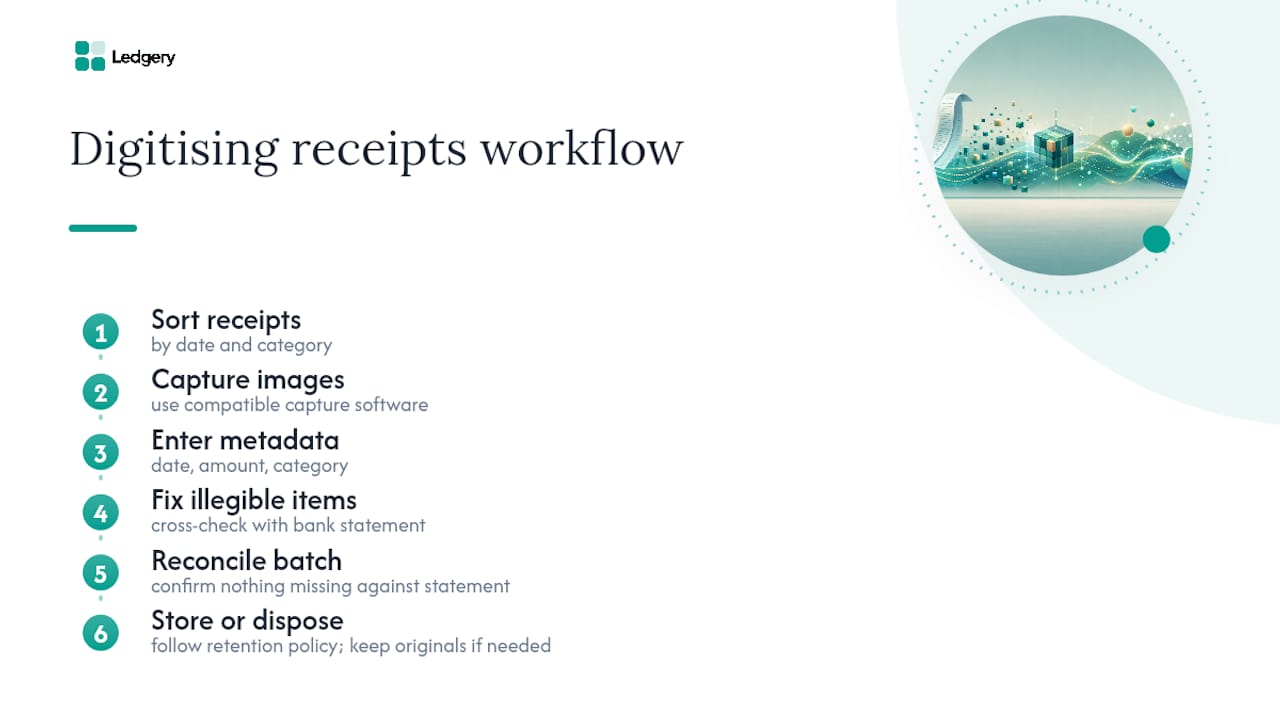
For each receipt, enter the date, the amount, and the category, checking that the category aligns with how your software structures its quarterly update categories. Where a receipt is faded or illegible, cross-reference it against your bank statement for the same period to confirm the amount and date before logging it.
Once digitised, reconcile the batch against your bank statement to confirm nothing has been missed, then file or dispose of the physical receipt according to your retention policy, keeping in mind that some documents may still need retention in original form for reasons unrelated to MTD. Repeat this process going forward for new receipts as they arrive, rather than letting a backlog build again, since catching up on months of paper is always harder than staying current.
Publisher perspective: making the rules workable day to day
Rules on paper are one thing. Fitting them around an actual working week, one where you are running a business or managing tenants rather than studying legislation, is another. Ledgery was built around that gap. It provides receipt scanning technology that lets you photograph a receipt on the spot, and it automatically organises that captured data into quarterly updates structured for HMRC submission, with a free first quarter and deadline alerts built in.
At a practical level, the value of a tool like this sits in exactly the areas this guide has covered: mapping captured data to the mandatory fields (date, amount, category) automatically, rather than leaving that step to manual entry, and maintaining a consistent audit trail that supports the digital link requirement rather than quietly breaking it. That audit trail is what you would otherwise have to build and test yourself across separate apps.
That said, software handles the mechanical side of compliance, not judgement calls. If your property income involves joint ownership with unusual splitting arrangements, or you are dealing with a transaction type that does not fit neatly into standard categories, it is worth involving an accountant or tax agent alongside your software rather than instead of it.
— Jason
A compliance route built around how you already work
There are other ways to approach this: hiring a bookkeeper to manually process your receipts each quarter, building your own spreadsheet system and hoping the digital links hold up, or trying to bolt together several apps yourself. Each works, up to a point, but each also asks you to become the person responsible for stitching the digital link together, which is precisely where most compliance failures happen.
Ledgery is built to remove that stitching work. You photograph a receipt, and the platform captures the date, amount, and category directly into a quarterly update structured for HMRC submission, keeping the digital link intact without you managing exports and imports between separate tools. Ledgery’s free first quarter means you can test the whole process, receipt scanning, categorisation, and deadline alerts, before committing to a subscription, which matters most if you are approaching one of the phased thresholds and need to be ready before it applies to you.

If you earn over £50,000 from self-employment or property and April 2026 is approaching, visit the Ledgery landing page to start your free first quarter and see your captured receipts turned into a structured quarterly update.
Where to check the official rules yourself
For anything binding or procedurally specific, go directly to the primary source rather than relying on secondary guidance, this article included.
- Create digital records - Use Making Tax Digital for Income Tax covers the definition of a digital record, mandatory fields, and timing requirements.
- Find out if and when you need to use Making Tax Digital for Income Tax sets out the phased thresholds and eligibility.
- The Income Tax (Digital Obligations) Regulations 2026 is the underlying legislation for digital record-keeping and quarterly updates.
- Digital record-keeping direction for Making Tax Digital for Income Tax details the simplified retail sales option and special customer group arrangements.
Sources
- Create digital records - Use Making Tax Digital for Income Tax
- Find out if and when you need to use Making Tax Digital for Income Tax
- The Income Tax (Digital Obligations) Regulations 2026
- Digital record-keeping direction for Making Tax Digital for Income Tax
Recommended
Self-employment and property income in one subscription, first quarter free. Join the early access list and we’ll email you once, when it opens.
Join early access