From £50,000: MTD for ITSA Checklist for UK Sole Traders & Landlords

MTD for ITSA applies to sole traders and landlords with qualifying income over £50,000 from 6 April 2026, with lower thresholds following in later years. If you meet the threshold, you must keep digital records, send quarterly updates to HMRC, and submit a final digital tax return each year. HMRC publishes exemption rules and eligibility checks on GOV.UK for anyone unsure of their position.
TL;DR:
- Businesses must keep digital records close to the point of transaction and use HMRC-recognized software to comply with MTD for ITSA starting April 2026 for those earning over £50,000.
- Quarterly updates, due on the 7th of the month following each quarter, are summaries of income and expenses that do not affect tax owed but feed into the final annual return.
- The first-year soft landing allows late quarterly updates without penalties, but late final returns or payments still face penalties, making early trial runs advisable.
- HMRC combines income from all sources to determine eligibility, so multiple businesses or jointly owned property affect thresholds; changing circumstances don’t retroactively change obligations.
- Using receipt-scanning apps and automated software like Ledgery simplifies record-keeping and helps meet HMRC’s digital requirements, reducing manual efforts and errors.
Table of Contents
- Who needs to use MTD for ITSA?
- What counts as digital record-keeping under MTD?
- What do quarterly updates actually involve?
- What’s the timetable for the first year, and is there a soft landing?
- How do you sign up, and can an agent do it for you?
- Are there exemptions from MTD for ITSA?
- What’s the 30 to 90 day plan to get compliant?
- How Ledgery fits the MTD workflow
- How do you maintain and submit digital records throughout the year?
- What happens if your income changes mid-year?
- How does MTD for ITSA connect with other HMRC services?
- What actually matters once the paperwork is sorted
- Where to check the official rules yourself
- Get your records ready before your MTD start date
- Sources
Who needs to use MTD for ITSA?
Qualifying income is your total turnover from self-employment plus property income, before deducting expenses. HMRC calculates this using your previous tax year’s Self Assessment return, so your 2024/25 figures determine whether you join in April 2026.
The rollout happens in three stages:
- £50,000 or more — you must start using MTD for ITSA from 6 April 2026
- £30,000 or more — you join from 6 April 2027
- £20,000 or more — you join from 6 April 2028
HMRC will notify you when you need to sign up, but you shouldn’t wait for a letter. Add up your self-employment turnover and gross property income yourself and check against the thresholds, because notification delays and address changes happen. If you run more than one business, or you jointly own a rental property, HMRC combines your qualifying income across all sources when working out whether you cross the line.
What counts as digital record-keeping under MTD?
The Income Tax (Digital Requirements) Regulations 2021 require you to record each transaction digitally close to the point it happens, capturing the date, the amount, and the category of income or expense. You don’t need to buy one single “MTD product.” HMRC recognises several set-ups:
- All-in-one accounting software that records transactions and files updates directly
- Bridging software that pulls figures from a spreadsheet into HMRC’s system
- Receipt-scanning apps that log expenses as they occur and feed a compatible platform
HMRC doesn’t build or sell software itself. It maintains a list of compatible products that you should check before committing to anything.
Typing three months of receipts into a spreadsheet the night before a deadline isn’t compliant, because records must be created from the point of origin, not reconstructed later. Smaller businesses below a set turnover threshold can use three-line accounts, reporting just income, expenses, and net profit rather than a detailed breakdown.
Pro Tip: Photograph receipts the day you get them. A habit that takes ten seconds per receipt avoids a weekend of guesswork every quarter.
What do quarterly updates actually involve?
A quarterly update is a running summary of income and expenses, not a tax return. It doesn’t calculate what you owe and it doesn’t trigger a payment. HMRC uses it to build a cumulative picture of your income across the year.
For a standard tax year running from 6 April, the deadlines fall on the 7th of the month following each quarter:
- Quarter to 5 July: submit by 7 August
- Quarter to 5 October: submit by 7 November
- Quarter to 5 January: submit by 7 February
- Quarter to 5 April: submit by 7 May
Your final digital tax return is a separate submission, due by 31 January following the end of the tax year. This is where dividends, savings interest, capital gains, and any reliefs get added, and where your actual tax bill gets calculated.
Payments on account work exactly as they did under the old Self Assessment system. Quarterly updates don’t change what or when you pay; they simply change how often you report.
What’s the timetable for the first year, and is there a soft landing?
If your qualifying income exceeds £50,000 for 2024/25, you must start keeping digital records from 6 April 2026 (or 1 April for those using calendar-quarter reporting). Your first quarterly update falls due that August.
| Milestone | Date |
|---|---|
| Digital records begin | 6 April 2026 (or 1 April for calendar quarters) |
| First quarterly update due | 7 August 2026 |
| Soft landing on late quarterly updates | 2026/27 tax year only |
| Points-based penalties resume | From 2027 onward |
| First final digital tax return due | 31 January following the end of the tax year |
HMRC has confirmed a soft landing for 2026/27: no penalty points for late quarterly updates in that first year. Late final returns and late payments still carry normal penalties, so the leniency is narrow. Run a trial quarter before your real start date. It’s the cheapest way to find gaps in your process while nothing is actually at stake.
How do you sign up, and can an agent do it for you?
Signing up follows three steps: confirm your qualifying income against the thresholds, choose compatible software, then either sign up through HMRC’s online services yourself or authorise an agent to act for you.
An accountant or bookkeeper can complete the sign-up and file every quarterly update on your behalf, but legal responsibility for accuracy and deadlines stays with you, not the agent.
- Check your qualifying income against the £50,000 / £30,000 / £20,000 bands
- Select and set up MTD-compatible software before your start date
- Sign up directly or give written authorisation to an agent
- If HMRC’s letters don’t match your understanding of your status, check the eligibility guidance directly rather than assuming the letter is wrong
Are there exemptions from MTD for ITSA?
Some taxpayers don’t have to join, even above the income thresholds. HMRC recognises exemptions for digital exclusion (no reasonable way to use software because of location, disability, or other personal circumstances) and for certain serious personal circumstances that make compliance impractical.
- Digital exclusion, including limited internet access or a disability that prevents software use
- Religious grounds incompatible with electronic record-keeping
- Age, health, or other personal circumstances that make digital compliance impractical
You apply through the exemption process on GOV.UK, which sets out what evidence HMRC expects. Seasonal income and mid-year changes don’t exempt you automatically. They simply mean your qualifying income calculation may shift for the following year. For anything agent-related or unusual, HMRC’s guidance collections and professional bodies such as the Chartered Institute of Taxation are the most reliable next stop, alongside a landlord-specific breakdown like Ledgery’s MTD guide for landlords.
What’s the 30 to 90 day plan to get compliant?
Work backwards from your first quarterly deadline rather than your start date, because software set-up and habit-building both take longer than expected.
- Calculate your qualifying income from last year’s Self Assessment figures
- Choose and install MTD-compatible software, checking it against HMRC’s software list
- Set your reporting periods (standard or calendar quarters) and start digital record-keeping from your statutory date
- Turn on receipt capture and photograph every expense as it happens, not in batches
- Run a test submission before the real deadline, and set calendar reminders for each of the four dates
Reconcile your records against bank statements before the final digital return, and keep dated evidence if you’re pursuing an exemption. Success looks unremarkable: records that are current, updates filed on time, and a final return with no surprises in January.
Pro Tip: Treat the first quarterly update as a fire drill. If it takes three hours to prepare, that’s three hours you can automate away before the second one.
How Ledgery fits the MTD workflow
Digital record-keeping under MTD depends on capturing transactions as they happen, and that’s the exact gap Ledgery was built to close. Ledgery lets you photograph a receipt with your phone, then organises that data into the quarterly format HMRC expects, reducing the manual entry that trips up most first-time filers.
- Automated receipt scanning that timestamps and categorises expenses at the point of origin
- Quarterly update generation aligned to the 7th-of-the-month deadlines
- Deadline alerts so you’re not relying on memory across four submission dates
Ledgery offers a trial period that allows users to test the workflow before committing. Jason and the wider editorial team behind Ledgery’s blog write regularly on self-employment registration and quarterly reporting mechanics, drawing on HMRC’s own published guidance rather than second-hand summaries.
How do you maintain and submit digital records throughout the year?
Consistency matters more than sophistication here. The regulations require records “from the point of origin,” which means the moment you receive income or incur an expense, not the week before a deadline.
Set a routine: log transactions daily or weekly rather than monthly. Most compatible software, including receipt-scanning apps, timestamps entries automatically, which gives you a clean audit trail if HMRC ever asks questions. Categorise as you go, splitting income by source (self-employment versus property) and expenses by type, because your software needs this structure to build each quarterly update correctly.
Before each submission date, review the period’s transactions for anything missing, a receipt you forgot to photograph, or a bank transfer you didn’t categorise. Submit through your software’s HMRC connection well before the 7th, since last-minute technical issues shouldn’t cost you a soft-landing exemption that only covers genuine lateness. After the fourth quarter, don’t assume you’re finished. The final digital tax return still needs you to check and add income HMRC doesn’t see quarterly, such as dividends or savings interest, then confirm the whole year before the 31 January deadline. Keep records for at least five years after the submission deadline, in line with standard Self Assessment retention rules, since HMRC can request evidence well after you’ve filed.
What happens if your income changes mid-year?
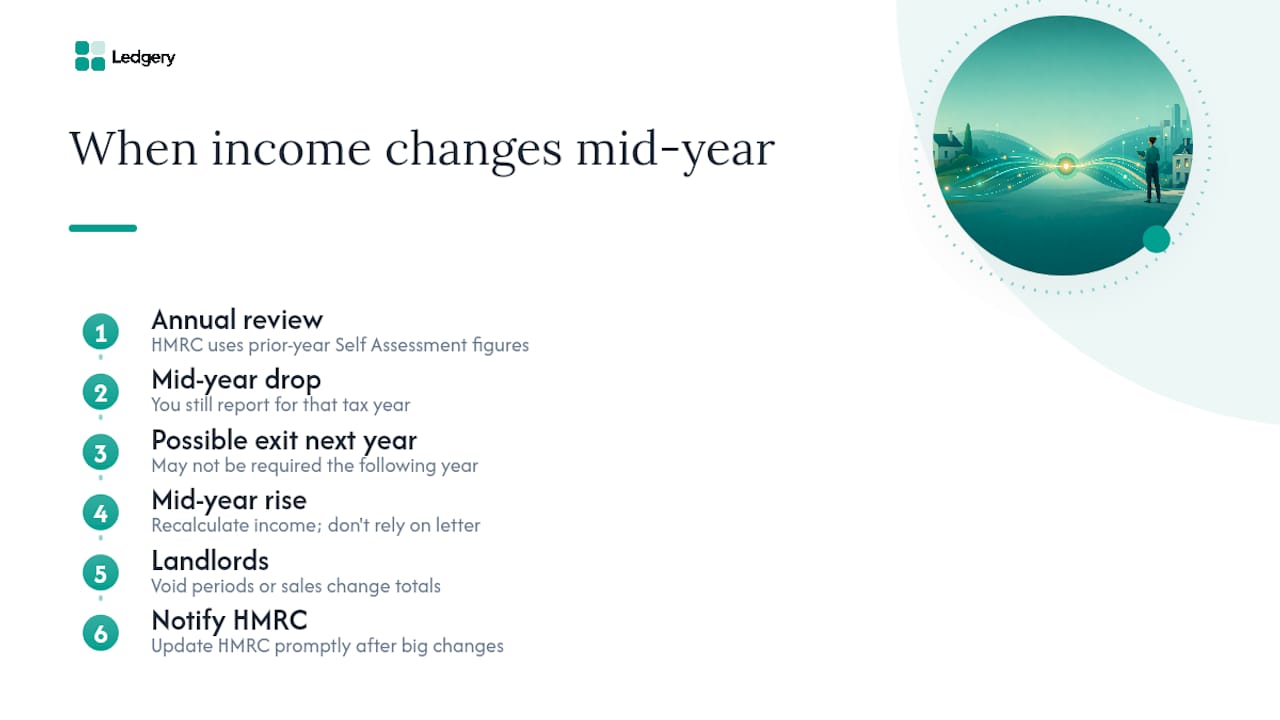
MTD eligibility isn’t fixed once you’re notified. It’s reviewed using your qualifying income each tax year, so a change in circumstances can move you in or out of scope going forward, though it won’t retroactively remove an obligation you’re already in.
If your income drops below the threshold after you’ve joined, you continue reporting under MTD for that tax year. HMRC assesses your position annually based on the prior year’s Self Assessment figures, so a lower year doesn’t pull you out mid-stream, but it may mean you’re not required to continue the following year if you stay below the relevant band.
If your income rises and pushes you into a lower threshold band earlier than expected, for example crossing £50,000 when you’d expected to join at the £30,000 stage, HMRC’s notification should catch this from your submitted returns. Don’t rely solely on that letter arriving. Recalculate your qualifying income at the end of each tax year and compare it against the current thresholds yourself.
Landlords with fluctuating rental income, seasonal lets, or a property sold partway through the year face a similar recalculation. A void period or a mid-year sale changes your total qualifying income for that year, which affects whether you’re still required to file in the following one. When your circumstances shift substantially, whether through a new business, a change in rental portfolio, or ceasing self-employment altogether, update HMRC promptly rather than waiting for the annual review to catch up.
How does MTD for ITSA connect with other HMRC services?
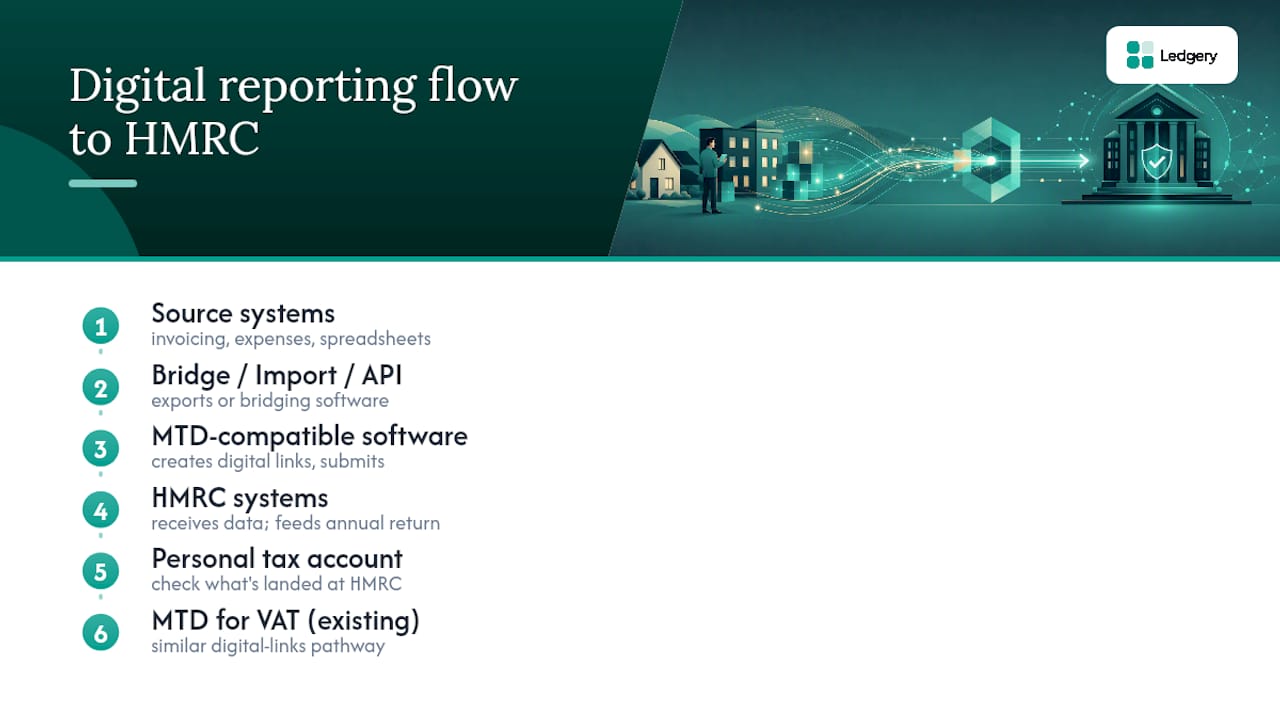
MTD for ITSA doesn’t replace Self Assessment. It changes how you report during the year and then feeds into the same annual return you’ve always submitted, now filed digitally through compatible software rather than HMRC’s own online portal.
Your personal tax account remains the place to see your overall position, including PAYE income if you’re also employed, National Insurance records, and any outstanding balances. MTD-compatible software talks to HMRC’s systems in the background, but your personal tax account is still worth checking periodically to confirm what’s actually landed on HMRC’s side.
If you’re VAT-registered, you’re likely already familiar with the mechanics, since MTD for VAT uses the same digital-links principle: records created digitally, transferred without manual retyping, and submitted through recognised software. Businesses already reporting VAT digitally often find MTD for ITSA a smaller leap, because the record-keeping discipline is already in place.
If you use a separate system for invoicing or expense tracking, check whether it exports in a format your MTD software can import, or whether it connects via an API. Bridging software exists specifically for businesses that don’t want to abandon a spreadsheet-based system, letting you keep existing habits while still meeting the digital links requirement. Recovering unpaid invoices before they distort your quarterly figures matters too. A structured approach to chasing outstanding payments keeps your reported income closer to what you’ve actually received, which simplifies reconciliation at year-end.
What actually matters once the paperwork is sorted
The tax rules themselves haven’t changed. What’s changed is frequency and method: four digital touchpoints a year instead of one annual form, and software instead of a shoebox of receipts. Treat that shift as a business habit rather than a compliance chore, and it pays for itself in fewer January surprises and a clearer view of your own cashflow. Nothing here has moved your tax bill. Use the checklist above, start earlier than you think you need to, and if manual entry is eating your evenings, a tool like Ledgery’s trial is worth testing before your first real deadline.
— Jason
Where to check the official rules yourself
For primary reference, bookmark HMRC’s quarterly updates guidance, the eligibility checker, the submission guidance, and the underlying Income Tax (Digital Requirements) Regulations 2021. These pages update as thresholds and deadlines are confirmed, so they’re worth revisiting each tax year rather than relying on this article alone.
Get your records ready before your MTD start date
Ledgery is built for exactly the gap most sole traders and landlords hit first: turning a shoebox of receipts into records that already match what HMRC expects each quarter. Rather than reconciling a spreadsheet the night before a deadline, you photograph receipts as they arrive and Ledgery organises them into a quarterly update, ready for submission ahead of the 7th-of-the-month dates set out earlier.
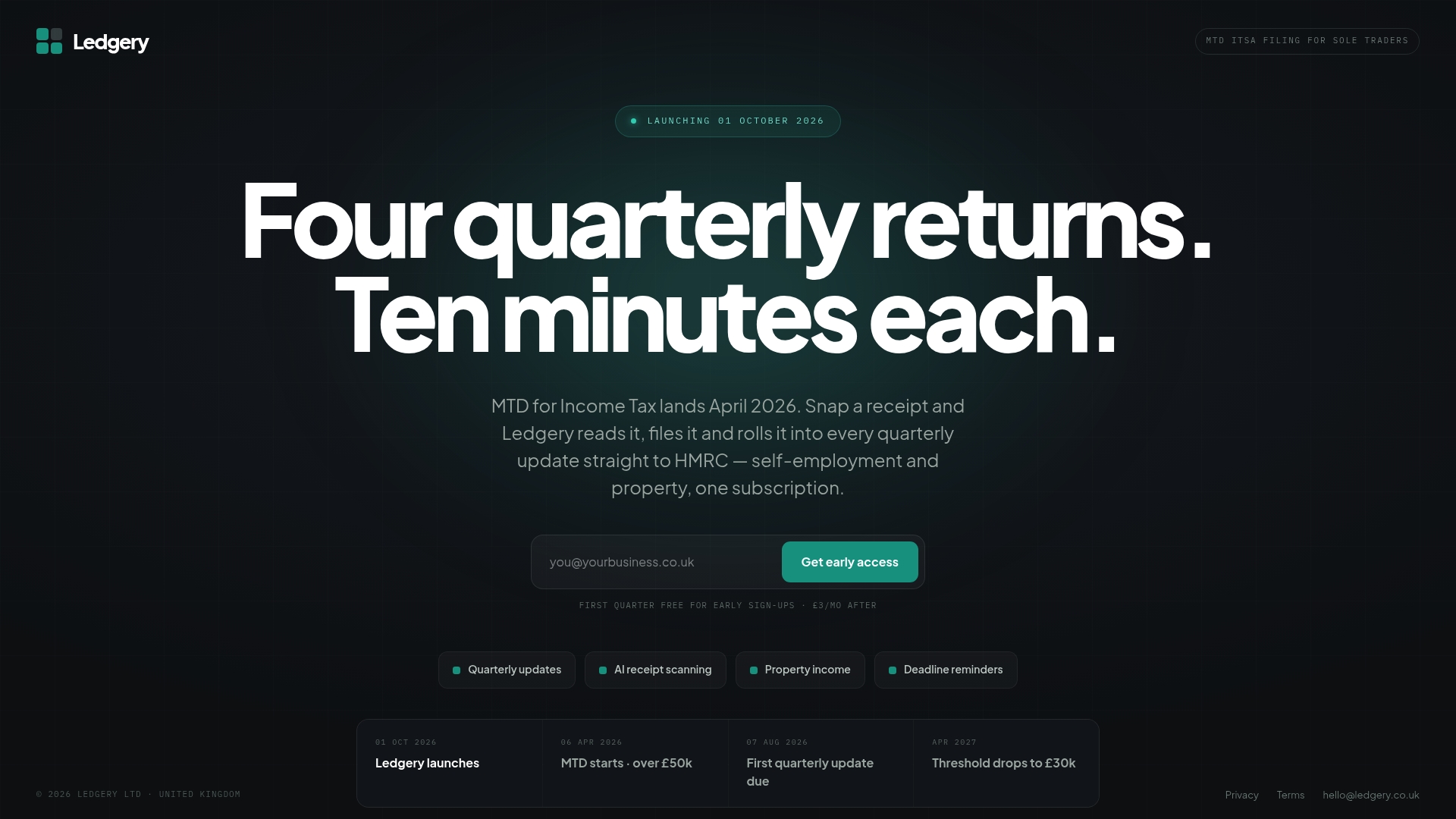
It suits sole traders and landlords approaching the £50,000 threshold in particular, since software deadline alerts can be designed around quarterly and annual submission dates. A trial period offers a test run before committing to anything. If you’ve read this far because your April 2026 start date is approaching, the practical next step is to start your free trial quarter with Ledgery and see whether your first quarterly update takes minutes rather than hours.
This article is general information, not a substitute for advice from a qualified financial advisor. Consult a qualified financial professional about your own circumstances before acting on anything here.
Sources
Recommended
Self-employment and property income in one subscription, first quarter free. Join the early access list and we’ll email you once, when it opens.
Join early access